

The most useful way to reduce ChatGPT hallucinations is to give it reliable evidence, define what it must not invent, and verify the important parts of its answer. Paying for a bigger plan can help with capacity and access to models, but it does not buy guaranteed accuracy.
There is also a common assumption worth checking: if you start a task, open another chat, then launch a third task, are you giving ChatGPT too much work and making it hallucinate?
The official sources reviewed for this article do not establish that relationship. Several active tasks can create practical challenges with usage and human supervision. That is different from evidence that extra tabs directly cause false answers.
This guide explains how to improve the work you receive, decide whether an upgrade is worthwhile and avoid spending your allowance on preventable rework.
Research checked: 2 November 2026. Plan features and usage rules can change.
What is a ChatGPT hallucination?
A hallucination is a plausible answer that contains false or invented information. Examples include a nonexistent study, an incorrect product feature or a quotation that nobody actually said. OpenAI’s explanation of ChatGPT’s reliability limitations warns that confident wording can accompany an incorrect answer. OpenAI Help Center
For a small business, that could mean an article naming an unavailable service. For a creator, it could mean a caption presenting an old announcement as breaking news. A polished result can still contain a basic factual error.
OpenAI’s research on why language models hallucinate discusses how training and evaluation can reward guessing instead of acknowledging uncertainty. It does not identify the number of browser tabs as the explanation. OpenAI
Your practical goal is to make unsupported guesses easier to catch before they reach a customer, reader or colleague.
Does running multiple chats make ChatGPT less accurate?
There is no verified universal rule saying that two, three or five simultaneous chats cause hallucinations. I found no controlled comparison in the official sources reviewed that establishes such a threshold.
Consider this example:
- Chat A researches an AI news article.
- Chat B writes a sales email.
- Chat C creates a spreadsheet from uploaded data.
These are separate requests. Opening them together does not prove that each answer receives less reasoning or becomes less factual. Avoid treating ChatGPT as a tired employee whose attention automatically splits across your tabs.
However, the person reviewing the work has limited attention. You might overlook an unsupported statistic in the article, approve an outdated offer in the email or miss a formula error in the spreadsheet. This is a workflow risk, not a measured claim about model degradation.
There is a separate product consideration: OpenAI’s ChatGPT Work and Codex documentation says those experiences share a usage structure. Several substantial tasks can therefore draw on the same allowance. Regular Chat currently has separate rules, and OpenAI has announced broader usage sharing starting in December. Do not describe that future change as already universal today. OpenAI Help Center
Practical recommendation: Run independent tasks together when you can review them properly. Run dependent tasks in sequence when the next task needs the first task’s verified result.
A practical workflow for fewer ChatGPT mistakes
1. Supply the evidence that matters
For an invoice, provide the agreed amounts and payment status. For a course description, provide the actual curriculum. For a product comparison, supply the exact products and markets.
Ask ChatGPT to use those materials as its factual basis and flag missing information. If a client has not confirmed a launch date, the answer should say that rather than invent a plausible date.
For example:
Write the course description using the attached curriculum. Include only lessons listed there. Flag missing information separately. Do not invent certificates, outcomes, testimonials or guarantees.
This gives you a concrete boundary to check.
2. Request current research when freshness matters
Prices, software features and subscription rules can change. Ask ChatGPT to research the exact product and open the relevant official pages before answering.
OpenAI’s web search guidance explains that search can provide current information and citations. It also warns that results and citations can be incomplete or incorrect. OpenAI Help Center
Check the decisive source yourself. Does the page support the exact claim? Does it describe the right country, plan and date? A link about a feature’s announcement does not necessarily establish that your account has it.
3. Make uncertainty an acceptable answer
Use a clear instruction such as:
If the evidence is missing or conflicting, say what remains unverified. Do not guess to complete the requested format.
This is a useful instruction, not a guarantee. You still need to inspect the output. It gives you a standard against which to assess the answer, especially when a rigid template would otherwise encourage filling every field.
4. Use tools and spot checks for numbers
For a budget, request spreadsheet formulas or a reproducible calculation. Then inspect the assumptions, units and selected cells.
For example, if the task is to calculate commission on a property sale, specify the sale amount, percentage and whether tax is included. Check the result with a calculator. A correct formula applied to the wrong amount still gives the wrong business answer.
5. Separate evidence checking from polishing
For a client article, first establish the facts and links. Then draft the article. Finally, review it against the evidence and brief.
Ask for a targeted review: check every price, date, quotation and product feature. Request corrections supported by sources rather than a general reassurance that the article is accurate.
A second AI review can help identify issues, but agreement between two answers is not independent proof.

ChatGPT Plus vs Pro: what does upgrading actually improve?
Separate two questions: can your plan support the workload, and can the chosen model perform the task well?
As of the research date, OpenAI lists Pro 100, Pro 200 and Pro 500. Its Pro tier documentation states that Pro 200 includes more usage than Pro 100, while Pro 500 has the highest included usage of the three. Availability and the options offered to your account should be checked before purchase. OpenAI Help Center
Model access also differs by experience and plan. OpenAI’s current ChatGPT model guidance describes different thinking-level eligibility and model allowances. A more capable model may be useful for a difficult task, but an upgrade alone does not establish that a particular answer is correct. OpenAI Help Center
My recommendation is to consider upgrading when limits repeatedly interrupt valuable work, or when a model or capability you need is unavailable on your current plan. First compare the time saved with the extra cost.
If your problem is fabricated references, upgrading without changing your verification process leaves the underlying editorial problem unresolved.
The decision guide below is a workflow recommendation, not a benchmark or a promise about any subscription.
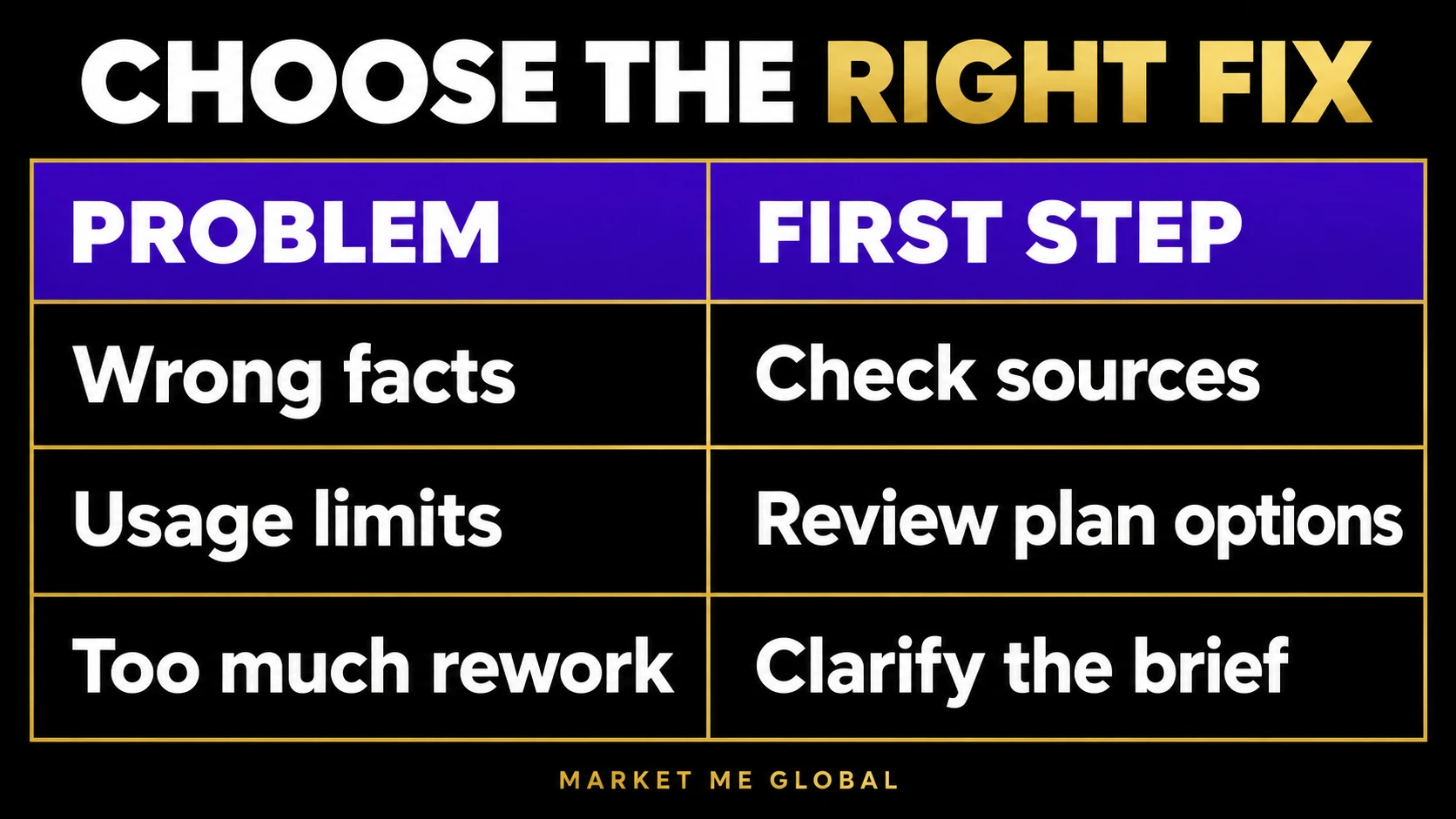
Should you finish one prompt before starting another?
For connected work, this is often the easiest process to supervise.
Imagine you want an AI news article, social captions and four supporting images. Research and verify the news first. Approve the factual draft. Then create the captions and images from the approved material.
If you launch all those tasks before confirming the facts, one incorrect assumption may spread through every asset. The problem is the dependency between outputs.
Waiting does not automatically reduce the total usage of otherwise identical tasks, and it does not reset an allowance. Its benefit is that you can correct the source material before commissioning the next deliverable.
For unrelated tasks, parallel work may be convenient. Keep a short list of each task’s purpose, source material and review status so finished work does not become approved work by accident.
Three additional ways to save ChatGPT usage and credits
Subscription allowance and purchased credits are related but different. Credits fund eligible additional usage; they are not a universal way to unlock every model or feature. Check the options displayed in your account. OpenAI Help Center
1. Match the model and effort to the task
Use a lighter option for straightforward formatting or extracting clearly stated information. Reserve more demanding settings for work that benefits from them.
In Work and Codex, OpenAI’s model selection guidance recommends testing models on representative tasks and keeping the lightest setting that meets your quality standard. Compare accuracy and repair time, not just response speed. The cheapest first answer can become expensive if it needs repeated correction. ChatGPT Learn
2. Provide focused inputs and define the finish line
Upload the relevant document or section, explain the audience and state the required output length. Keep information essential to the decision, but remove unrelated material.
For example: “Use this approved offer to write one 150-word email for existing customers. Keep the price and expiry date unchanged.” That is easier to review than an open-ended request to improve every part of a campaign.
OpenAI’s usage guidance recommends precise instructions, relevant source material and a defined output scope. It also explains that consumption varies with the model, context, reasoning and tools, so prompt count alone is a poor budget measure. ChatGPT Learn
3. Request targeted changes instead of full reruns
After receiving a useful draft, identify the specific problem. Ask for a revised opening or corrected calculation rather than regenerating the whole project.
For a visual package, settle the copy before asking for another set of images. For a report, confirm the structure before commissioning elaborate formatting.
These are practical ways to avoid unnecessary work. They do not support a fixed percentage saving, and a necessary full rewrite may still be the right choice.

Is using two accounts a good alternative?
A second account is not a hallucination remedy. OpenAI supports account switching, but conversations, files and subscriptions remain separate. A paid subscription does not transfer to the other account. OpenAI Help Center
OpenAI also documents card and device restrictions, which can affect additional paid accounts. Do not assume buying another subscription will always be possible or will pool your capacity. OpenAI Help Center
For readers who want to stay on their existing plan, I recommend narrowing the work, reviewing connected tasks in sequence and waiting for the displayed reset when necessary. Consider an upgrade or eligible additional credits only after identifying the actual bottleneck.
Key takeaways
- Treat confident wording as something to evaluate, not evidence of truth.
- Supply source material and check claims that matter.
- Use sequential work for dependent deliverables and parallel work when review capacity allows.
- Choose a plan for workload and access, then evaluate the model on your task.
- Conserve usage by controlling scope, choosing suitable settings and avoiding unnecessary reruns.
Frequently asked questions
Can I completely stop ChatGPT hallucinations?
Does ChatGPT Pro make fewer mistakes than Plus?
How many chats can I run without causing hallucinations?
Will doing one task at a time save my credits?
Can ChatGPT invent sources even if I ask for links?
Should I upgrade or improve my prompts first?
Build a workflow you can trust
Start with one real task: provide its evidence, set clear boundaries, use suitable tools and inspect the result. Keep what works as a repeatable process.
Then decide whether your current plan supports the volume you need. Better access can be valuable, but reliable work still depends on what you ask, what evidence is available and how you check the answer.