

For a varied professional workload, ChatGPT is the first assistant I’d trial. Gemini deserves priority if your work lives in Google Workspace or involves live visual help and media creation. Claude belongs on the shortlist for document revision and coding through Claude Code.
Those are workflow recommendations, not a declaration that one model wins every test. All three can help with research, writing and code. The useful question is which one can work with your material, use the right tools and leave you with a result you can actually use.
This guide compares the best AI chatbots in 2026 using official information checked on 10 November 2026. It distinguishes documented features from editorial advice. The examples are suggested trials, not claimed results from personal testing.
What changed in 2026, and why older comparisons mislead
A chatbot answers conversational requests. A tool-enabled assistant can also retrieve information, analyse files or create outputs. An agent goes further by carrying out several steps towards a goal using authorised tools.
That distinction matters more than the name on the chat window.
OpenAI now distinguishes ChatGPT Chat, Work and Codex: conversation, longer work with finished deliverables, and software development. Its legacy agent documentation explicitly redirects users to Work, despite retaining older instructions further down the page. Don’t build a purchasing decision around those historical agent quotas. help.openai.com
Google’s October release notes introduce Gemini 4 Argon and Antigravity coding agents inside its Mac app. Anthropic’s 9 November announcement introduces Fable 5.2 and restricted-access Mythos 5.2, while recommending Opus 5.5 as the starting point for most coding and knowledge tasks. gemini.google
The lesson: compare the product, task mode and tools you can access. A provider’s newest model might not power every feature, and an API announcement doesn’t automatically describe your subscription.
Best AI for research: choose the sources first
My recommendation: start with ChatGPT for research combining public sources and uploaded files, or Gemini when authorised Google Workspace context is central. Claude is also a credible research option for paid users.
ChatGPT deep research can use the public web, uploaded files and eligible connected apps. It offers a reviewable plan and cited reports. Its connected-app research actions are read-only, a useful distinction from an agent authorised to modify something. OpenAI Help Center
Gemini Deep Research supports web research, uploads and selected sources such as Gmail and Drive when connected. You can edit the research plan. However, Google’s documentation says certain report visuals are unavailable when Workspace services are included as sources. Check the combination you need, not just the individual feature names. Gemini Apps Help
Claude Research is available on paid plans and can investigate the web and connected tools. There is a practical catch: research started on Claude Mobile searches the web without using connectors. Start on the web or desktop when internal sources matter. Claude Help Center
A useful research trial
Imagine a small agency preparing a competitor brief. Give each assistant the same question, permitted sources and cutoff date. Request five important claims, a direct source for each, publication dates and a list of unresolved questions.
Then open the sources. Does the page support the exact claim? Has the assistant confused an announcement with a launched feature? Did it present the vendor’s claim as independent evidence?
A polished report is a starting point for verification. For buying decisions, ask what evidence would change the recommendation. That often exposes weak assumptions more effectively than asking for another summary.

Best AI for writing: test revision, not just the first draft
My recommendation: trial Claude first for sustained document revision, ChatGPT for writing that feeds into broader deliverables, and Gemini when collaboration in Google Docs is the main constraint. This is editorial advice, not a measured ranking of prose quality.
Claude’s artifacts support reusable documents, presentations, designs and interactive tools alongside conversation. That makes the editing environment part of its appeal. ChatGPT’s Work experience is designed around longer tasks and outputs. Google’s subscription page includes Gemini in Docs and other Google apps on relevant plans. Claude Help Center
To compare writing assistants, supply a short brand sample, approved facts and a rough draft. Ask for a revision that preserves meaning, removes repetition and identifies unsupported statements.
Then make one specific follow-up request: shorten the introduction without losing its qualification. The better assistant is the one that retains your constraints through revisions, with fewer corrections from you.
For a business blog, separate research from drafting. Approve the factual material first, then develop the article. Otherwise, an elegant sentence can quietly introduce a promise your product never made.
Best AI for coding: compare the coding agents
My recommendation: put Codex and Claude Code on the first shortlist for repository work, and include Antigravity if its environment suits your setup. There is no defensible universal coding winner from the documentation alone.
OpenAI identifies Codex as its dedicated development experience. Claude Code reads repositories, edits files and runs commands. Google’s October update describes Antigravity in the Gemini Mac app planning, building and testing code in the background. help.openai.com
This is a different comparison from asking three chat windows to print a function. A coding agent needs access to the project, dependencies and validation commands. Its usefulness depends on how well it works within those constraints.
Try a contained bug: a contact form accepts an empty email address. Ask the agent to reproduce the failure, explain the cause, make the smallest appropriate fix and run the relevant checks. Review whether it changed unrelated files and whether its tests address the actual failure.
For a larger migration, request a plan and a reversible first step. Judge the resulting changes, test evidence and review effort. Vendor benchmarks can inform a shortlist, but a score from one model configuration does not settle which product will handle your repository best.
Best AI for multimodal work: define the input and output
Multimodal AI works across more than one medium, such as text, images and audio. Understanding an image, editing it and generating a video are separate capabilities.
My recommendation: trial Gemini first for live visual assistance and an integrated media workflow, ChatGPT for mixed files and image creation, and Claude for document and image analysis tied to written outputs.
Gemini Live supports conversational voice interaction and camera-based creative assistance. Google’s current video-generation page describes Gemini Omni, including video creation and editing, with subscription, age and geography restrictions. Don’t assume an older Veo comparison captures the current offering. gemini.google
ChatGPT supports document, spreadsheet, presentation, image and audio uploads, with audio uploads currently limited to paid subscriptions and workspaces. Its November release notes describe updated image generation and editing. A meeting recording that needs notes, an action list and a follow-up draft is a sensible trial. OpenAI Help Center
Claude supports document and image uploads. Read its extraction rules carefully: non-PDF documents are processed as text, so embedded images aren’t interpreted. Its current help page also distinguishes visual analysis for shorter PDFs from text-only handling of longer ones. Claude Help Center
Use a representative file before paying. A screenshot, scanned report and editable spreadsheet can expose very different strengths. Ask the assistant to identify unreadable or uncertain content instead of filling the gaps.
ChatGPT vs Gemini vs Claude: the workflow comparison
The comparison image summarises documented routes through each product. It is a capability map, not a scorecard or a promise that every account has every tool.
ChatGPT brings together reports and files, drafts and deliverables, Codex, images and audio files, and Work. Gemini connects web and Workspace research with a Docs workflow, Antigravity, Live and visual creation, plus connected apps and auto browse where available. Claude combines web and connector research, revision and artifacts, Claude Code, images and documents, and Cowork with computer use.
Those overlaps explain why a universal winner would be misleading. The deciding factor is often where your information already sits and what must happen after the answer appears.
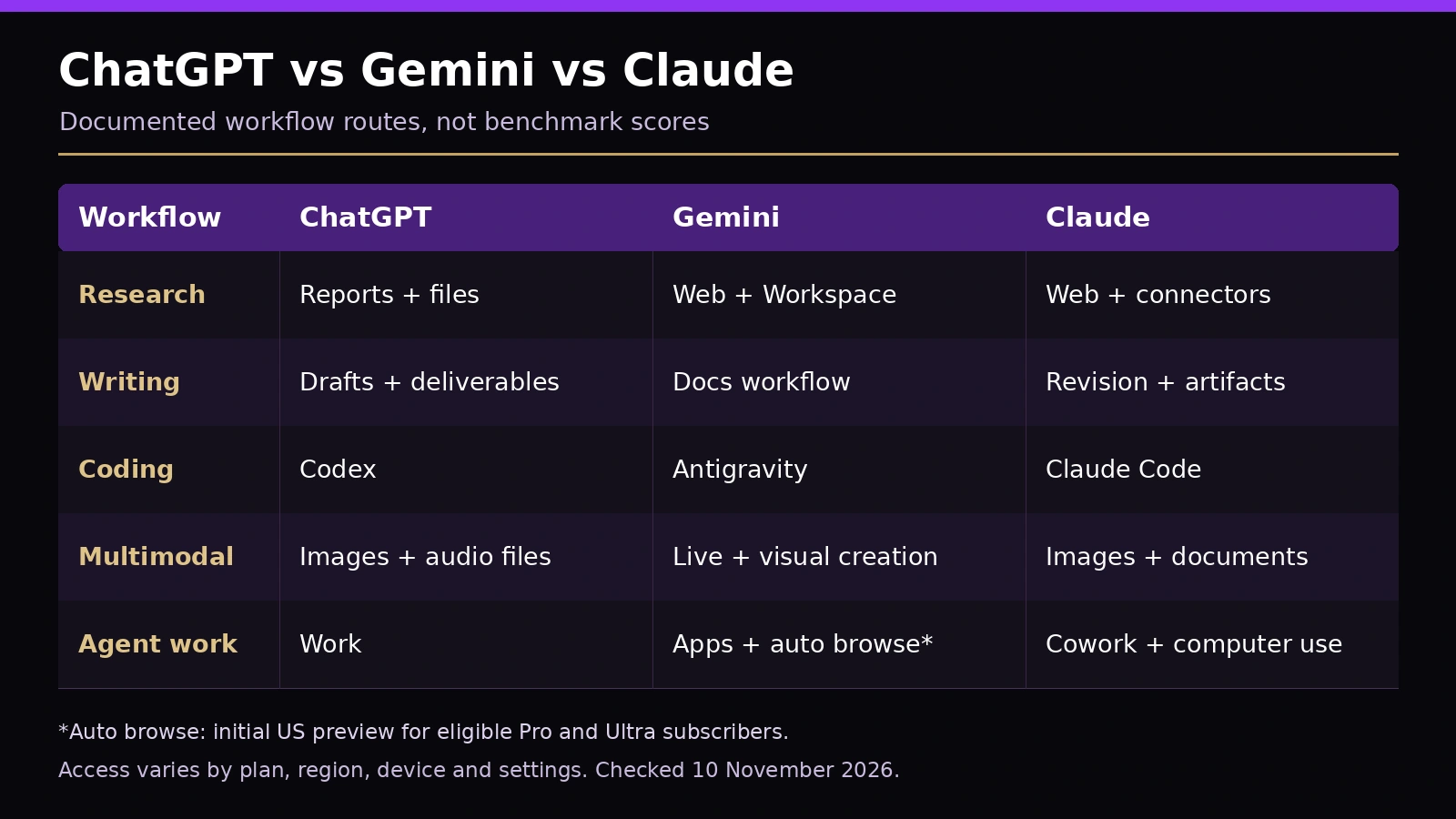
| Workflow | ChatGPT | Gemini | Claude |
|---|---|---|---|
| Research | Reports + files | Web + Workspace | Web + connectors |
| Writing | Drafts + deliverables | Docs workflow | Revision + artifacts |
| Coding | Codex | Antigravity | Claude Code |
| Multimodal | Images + audio files | Live + visual creation | Images + documents |
| Agent work | Work | Apps + auto browse* | Cowork + computer use |
*Auto browse: initial US preview for eligible Pro and Ultra subscribers. Access varies by plan, region, device and settings.
Best AI for autonomous tasks: choose the operating environment
My recommendation: trial ChatGPT Work for varied tasks across files and connected services, Claude Cowork for supported desktop workflows, and Gemini for Google apps or eligible Chrome automation.
ChatGPT Work supports longer tasks and scheduled work, subject to permissions and availability. Anthropic describes computer use in Cowork and Claude Code as a research preview for eligible paid subscribers on macOS and Windows. The desktop app needs to remain awake and running. help.openai.com
Gemini in Chrome advertises auto browse for tasks such as appointment booking, with the current page describing an initial preview for Google AI Pro and Ultra subscribers in the United States. Availability of a Google AI subscription in your country doesn’t establish access to that preview. AI assistance, right in your browser
Autonomy means delegated steps within an authorised scope. It doesn’t mean every action should happen without review.
A sensible first agent assignment
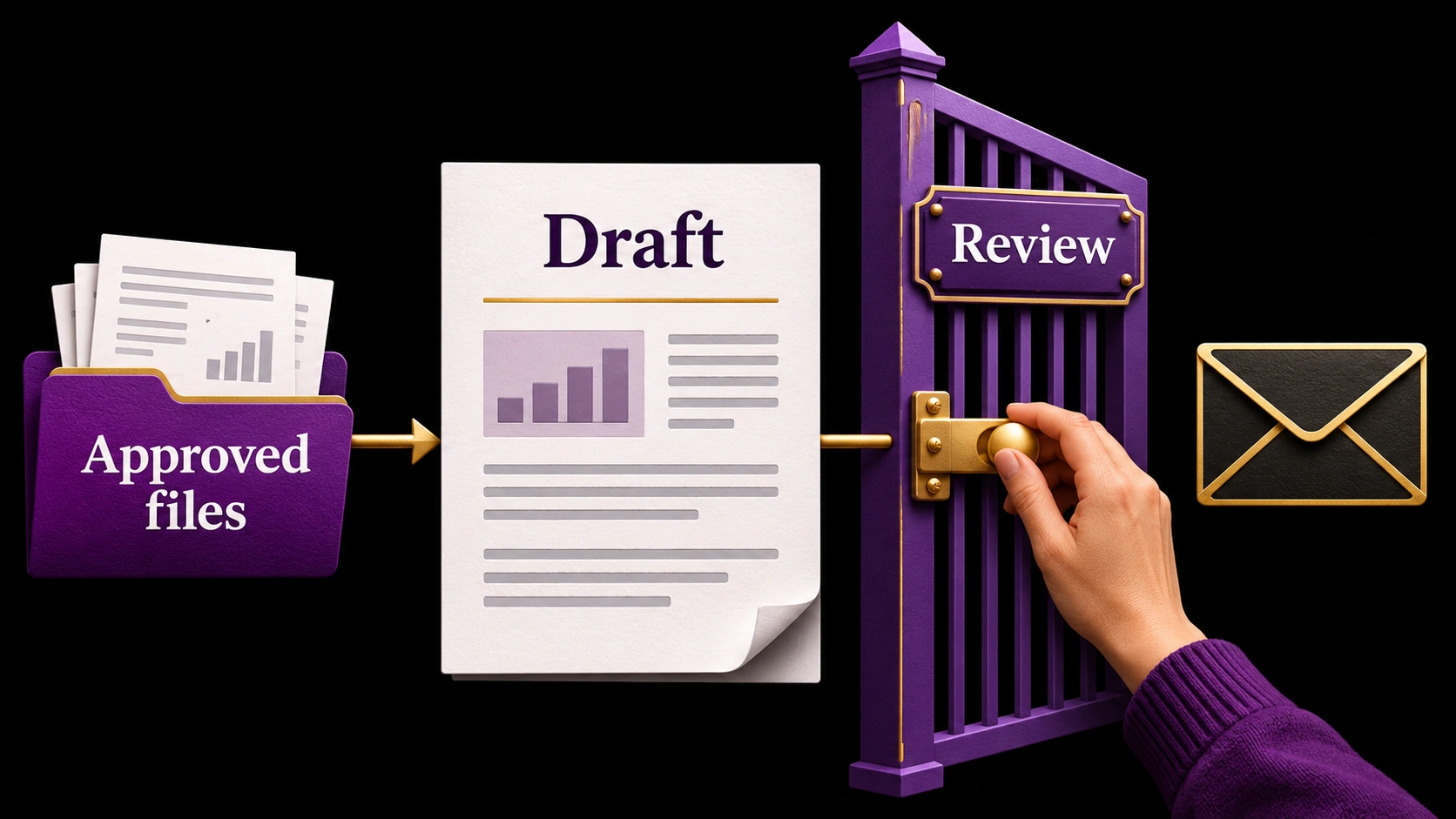
Try: “Use these approved files to prepare a weekly client update. Save a draft and list missing information. Show me the result before sending anything.”
That assignment has clear inputs, a useful output and an obvious stopping point. Check whether the assistant used the right files, preserved sensitive details appropriately and produced something you can review.
Once that works reliably, consider scheduling it. Keep publishing, purchases and consequential account changes subject to an explicit decision. A malicious instruction inside a retrieved page or document should never acquire authority just because the assistant can read it.
Free or paid: buy the capability you actually need
Start free when you’re exploring basic questions, drafting and occasional file work. Upgrade when a specific tool, allowance or repeated bottleneck justifies it.
As checked on 10 November 2026, the listed monthly prices are US$20 for ChatGPT Plus, US$19.99 for Google AI Pro on Google’s US page, and US$20 for Claude Pro billed monthly. These are list-price references, not checkout quotes for every country. Local currency, taxes, promotions and billing terms can differ. See the official ChatGPT Plus details, Google plans and Claude pricing. OpenAI Help Center
None of those prices means unlimited use of every capability. Google’s usage guidance explains that complex work consumes more allowance. Claude warns that models, chat length and file size affect usage. Work and Codex have their own shared usage structure within ChatGPT plans. Gemini Apps Help
For a team, review data handling, retention, administration and connected-app permissions before uploading client material. An individual paid plan is not evidence that your organisation’s requirements are satisfied.
How to choose without buying three subscriptions
Run a small comparison with three recurring jobs: one research question, one writing revision and one technical or file-based task. Use equivalent inputs and comparable access tiers.
Record factual corrections, manual editing, completion time and whether the output opens correctly in your actual workflow. Check the important claims yourself. A second assistant agreeing with the first is not source verification.
Choose the tool that requires the least repair on the work you do most often. Add another subscription only when it solves a repeated problem your first choice handles poorly.
Key takeaways
- ChatGPT is a practical first trial for varied work spanning research, files and deliverables.
- Gemini deserves priority for Google Workspace, live visual help and media workflows.
- Claude is a strong candidate for iterative writing and repository work through Claude Code.
- Product mode, permissions and availability matter as much as model names.
- Verify sources, inspect generated work and judge tools with representative tasks.
Frequently asked questions
Which AI chatbot is best overall in 2026?
Is Claude better than ChatGPT for writing?
Is Gemini the best AI for Google Workspace?
Which assistant should developers choose?
Can these assistants complete tasks autonomously?
Is a paid plan worth it?
The right assistant is the one that fits your work
Choose your first trial by the job: ChatGPT for varied deliverables, Gemini for Google-centred and media work, or Claude for document revision and repository assistance. Use the same representative tasks to compare them, verify the outputs and pay for the tool that saves you the most corrective work.
Try one of our AI chatbot solutions
Meet the Market Me Global AI assistant. Ask about our services or how a website chatbot could help your business.
Enable optional AI chat, then use the chat button in the bottom-right corner. This button can open it for you.
AI chat uses browser storage to remember conversations. Our chat software and AI processing providers receive your messages and technical information to answer you. Avoid sharing sensitive information. You can disable chat here or withdraw consent in Cookie settings at any time.
AI chat is optional. You can try it without enabling Analytics, Marketing or embedded media.